Jetfire Transformer - Old school version

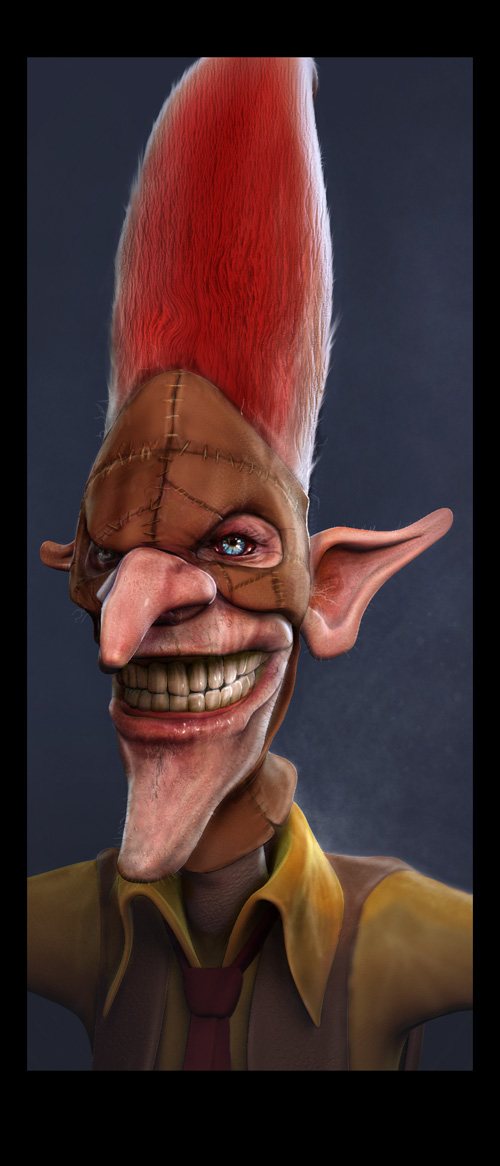
This old school Transformer was a client job that fell through some time back. I was looking through old hardrives to find interesting models for a friend when I came across him and I couldn't resit firing up Silo and Cinema4D and giving him a whirl.

I would LOVE to get this guy 3Dprinted at some stage but I assume theres some copyright issue there. For now he's firmly a piece of fan art and that's how he'll stay :)


___________________________________________________________

A ZBrush article from 2001

ZBrush is ten years old now. Unbelievable. I started to use it around 1999 and here are some scans from an article from 2001.

http://www.subdivisionmodeling.com/forums/showthread.php?p=48878#post48878

___________________________________________________________

Two new tutorials at the Enter3D site.


I've added two new videos to Enter3D. Both of them by my good friend Rob Redman from PariahStudios. They finish of the 'Basics' videos with Lighting and Rendering a 3D character. Check them out and give Rob a buzz with some feedback.


___________________________________________________________

Joining SparkleVFX*2 as Creative director


Sparkle Media Ltd is entering its 5th year as a motion graphics/post production agency. We’ve grown from strength to strength since opening in 2005. In the last few years our work has become heavily CGI based. This has lead to the formation of a venture in the form of a sister company to handle all the CGI and VFX based work allowing Sparkle Media to return to its media production roots.

Today see’s the soft launch of SparkleVFX, created to handle high end CGI & VFX for print, film & TV. The new company is the brainchild of Sparkle’s Managing Director Glenn Maguire.

“I wanted to create a new company that compliments Sparkle Media, taking the whole business in a new and exciting direction. We have new team members on board who promise to produce the best CGI in the north west of England!”

SparkleVFX would like to welcome its
New Creative Director and Head of CG Glen Southern to be part of the new team to head up SparkleVFX.
“Glen has a well established name in the CG industry not just in the UK but throughout the world, we feel especially proud having him head up the new company” Glenn Maguire Director SparkleVFX.

“It’s great to be part of something new like SparkleVFX but it is also reassuring to be joining a team of artists and designers with a proven track record. Sparkle are well known for providing quick turn rounds, quality work at competitive prices. I’m really looking forward to working with the team and hopefully adding more talented artists to the crew in coming months.” Glen Southern Creative Director SparkleVFX.

Glen (and SouthernGFX) is known for his character and creature creations and has credits from across the globe for print and film contributions. He is well known for his 3D training and working closely with a number of 3D software developers and his ability to motivate and manage large teams.

SparkleVFX will now handle all the CG work that originally came through Sparkle Media. This will include:
Character modeling (high and low polygon), product modeling, environment creation, bespoke motion graphics, CG animation, character animation, VFX shots for film & TV. All work will be available for print & motion use.

These are exciting times for Sparkle as a brand and we think this new launch will allow us to produce some of our biggest and boldest work to date.

Sparkle Media will also offer new services as it turns into a production company and media hub.
Services now offered include: Filming & Crew Hire (varying formats including RED), editing, grading, Audio Production/Mastering. In its new media section Sparkle Media will now also over print & web based consultancy for fully content managed site through static & flash sites, through to viral video and game production.


SparkleVFX is open for business as of tomorrow morning, with our major launch and handing over the websites on the 14th May. We’ll be showing off our new team at the FACT centre in Liverpool on the evening of 14th May as part of our on going commitment to CGI. The evening will be an “Entry to 3D”, all our welcome to come along and see live character modeling demos, take part and learn from Glen and the team.
On the night we’ll also be joined by Activision art directors giving advice on entering the games world, with some great giveaways including software license for the Nevercentre’s amazing modeling software Silo

The new company website is www.sparklevfx.com
http://www.sparklevfx.com the site will be in holding position until the 14th May when we’ll reveal our new and exciting portfolio. All new enquiries can be sent to your existing contact or to info@sparklevfx.com

___________________________________________________________

How to model Tado Choop!

My next video project at Enter3D is a cool series of videos that show you how to make a well known little character in 3D. I'm really lucky to have permission to model Tado's Choop in 3D.

If you have 2D character designs and you want to learn how to turn them into 3D models destined for animation or illustration then these videos are for you. And what better way to learn than to see an amazing design like Choop being turned into a 3D model

I've started a thread at Sub.D.com to discuss this project.

A massive thanks of course to @wearetado Mike and Katie. (catch them on twitter if you get time!)


___________________________________________________________

Enter3D Project 5-03 Basic head modeling tutorial 'Little Devil 2010'


Enter3D Project 5-03 Basic head modeling tutorial 'Little Devil 2010'


This is the latest addition to the Enter3D projects. I first did this tutorial about 4 years ago in Silo 1.4 . For some reason I've had lots of emails asking for it in recent weeks. As Silo 2.0 has changed in some significant ways I decided to re-hash the video and add it to Enter3D.

I'll be adding a few videos over the next few weeks so please feel free to follow the Blog for notification of new uploads. It's always great to get some feedback on a video so please take time to leave a comment below.

___________________________________________________________

Getting confused with Foo the Fox

I've just had a weird thing happen. I've been working on some ideas for a couple of characters called 'Foo and Bah' (Foo, a small intelligent fox and Bah! his muscle bound bodyguard sheep. I'd been drawing the Fox character for a while and I was getting frustrated as I couldn't get a feel for his anatomy. I wanted to keep him basic and cartoony and as usual I was over-engineering his anatomy. I really do struggle keeping to basic shapes. Where some designers will put in a stick for an arm and it works perfectly I try to put in the full anatomically correct arm with bones, muscles, fat etc. I kept on drawing the Fox over and over and I seemed to keep coming back to the same basic shape and it just didn't feel right for me.

I was about to Google for some reference images and then thought I'd quickly model a fox with primitives in 3D and then spin it around to get the form or silhouette locked off. I opened my favorite modeling package and threw down some boxes and spheres in no particular order. I messed around with them for a few minutes and started to get a basic Fox shape together. Before I knew it I'd gone from primitives into detailed modeling, added a few colors that suited the Fox and started trying out different poses and facial expressions that I had struggled with in the pencil sketches. In no time at all I'd hit upon the right design and I was happy that the anatomy was right for this project.

It is quite liberating to do your concept work in 3D, trying out different shapes, making scale changes to limbs, trying different expressions etc. I used my 3D model as a drawing reference and sketched out five or six different turnarounds and I was pretty happy with every one. I chose one and inked it, scanned it in and did some quick Photoshop coloring.

All done I thought. I'd nailed the concept via a very unusual concept process. Now all there was to do was to use the reference image and make the 3D model....oh..wait...I already did that bit!. Doh! Very confused.com

EDIT:

Added his partner in crime tonight the evil henchman of the piece, 'Bah! the Sheep'. Be VERY careful tonight as Foo & Bah are after your Easter Eggs! Guard them with your life! If you haven't scoffed 'em all already. Happy Easter!

___________________________________________________________

Help me out with screen shots.


If anyone wants to help out I'd be ever so grateful. I want to put a screen shot and some images of all major 3D packages and wondered if anyone felt like contributing. I'm updating my old Sub-D Primer as part of my new Enter3D area and I would like to show some examples.

I'm looking for:

1. An interesting screen shot of your 3D program of choice
2. A wire frame shot of one of your models
3. A render if poss.
4. A few words about why you like the package in question.

Zip them up and fire then over to glen.southern@southerngfx.co.uk

Bear in mind that the Enter 3D site is aimed at 2D artists coming to 3D for the first time. What would you show or say about your favorite 3D package?

And if you REALLY love your 3D package, do a little video and send it to Youtube and fire me the link. Now that would be cool!

So far I'm looking for:

Silo
Blender
Wings3D
Lightwave
Modo
Maya
C4D
3DSmax
XSI
Mudbox
ZBrush
3DCoat

and I'm open to offers to add the ones I've missed.

If you look at the Primer Page 2 you'll see where this is going.


Thanks already to Warner for some Modo images and Dave Bates (as ever) for sorting out the scripting for me.

___________________________________________________________

Entering the Third Dimension (NOW OPEN)


Are you finding that your sketch books are overflowing with characters these days? Have you been wondering what some of those character would look like if they were a little more three dimensional? Well come on in and Enter the Third Dimension....

Q&A

Whats this Enter3D stuff then?

I've been doing tutorials and 3D training videos for a long time now. I've been working with more and more 2D designers and especially 2D character designers. More and more people have been asking about how to get their concepts into 3D. This new area of my website is designed to help.

What will I find there?

Help and support for one thing. I want to help anyone new to modeling get a feel for how subdivision modeling works and how to learn the basics. The new area of the site is broken down into:

An Introduction
The Basics
Some Projects
A Subdivision modelers Primer

I will use this framework as a place to keep my future tutorial videos. If you have specific requests then please feel free to add comments in this blog post.

Is it finished
?

Nope. Not by a long way. I've been getting help and feedback from some amazing designers and I've been given some amazing character designs to use in future tutorials. The site is there as a resource for future modelers and a place to add new video content as I produce it.


Thanks have to go to Wes and the KURV guys who host all my stuff. The ever supportive Nevercenter Silo team for sponsorship and encouragement. For help with or for providing character designs and reference images James Yeah!, Moopf, Tado, Steve Cairney, Steve Talkowski, George Coghill, Lawrence Basso and many more to come. For constant advice and reality checks Wayne Robson, Dave Davidson. The multi-talented Glenn McGuire at Sparkle Media and Anthony Fillice my business guru and life coach. Oran Parker for design feedback. What would I do with out you all and the hundreds of others who I have the pleasure of interacting with on a daily basis. Thanks!

Follow me on twitter for updates.
___________________________________________________________

Entering the Third Dimension

I've been working on a new area of my website for a few weeks now. It's a new tutorial area and I'm hoping to fill it up with training videos over the next few months. For about a year now I've been taking commissions for toy work, both commercial jobs and fun projects. I've spent a little time improving my vector skills and even done a few physical sculpts from ideas that I've really liked.

I decided to set up the new tutorial area in response to lots of emails I've had from 2D artists who want to make the leap into 3D, hence the title 'ENTERING THE THIRD DIMENSION.' Rather than focus on one specific program the videos are made using a range of applications that do a wide variety of things e.g. Silo for modeling, Headus UV for adding UV's, Cinema4D for rendering, ZBrush for sculpting and texturing etc.

I've asked a few fellow artist to let me use their images and characters as reference material so I should be able to show how to make a wide range of characters and creatures and show lots of different techniques along the way. I want to keep adding to the new area in coming months so I've made it expandable.

The tutorials are broken down as follows:

-Preparing a concept image
-Getting the reference image in the viewport background
-Subdivision basics
-Box modeling v point by point
-Using primitives to build shapes
-Modeling in parts and managing objects
-Using material sets to color your characters
-Creating UV co-ordinates
-Creating a texture using a UV map
-Lighting and rendering

Project videos:

1. Basic Penguin toy character using box modeling.
2. Point by point modeling a small character from vector reference.
3. Using primitives to form a character and scene (Artwork by Moopf).
4. Using text in your creations (Artwork supplied by Steve Cairney).
5. How to UV map a complex toy model using Headus UV
6. Sculpting a toy with ZBrush
7. Setting up a toy product shot in Cinema 4D.

I'm hoping to open the new website area by the end of the month and I'll blog and twitter when it's released.


___________________________________________________________

New SouthernGFX Ident logo


I settled on my ident design. A big thanks to Wayne Robson, Glenn McGuire and Oran parker who gave me either inspiration for this little project or design ideas. I decided on the compass point idea for a number of reasons:


1. It's very simple and as a stand alone shape it can mean lots of different things.
2. The link to a compass point (pointing south) is a reference to my name. It doesn't look so much like a compass point in it's final form that it becomes cliched (Like a rip off of the Safari logo for example).
3. The shape has ended up looking like an alien (sort of) which gives me the link back to my work
4. I tried the shape out on a card, pin badge and as a web icon and it seemed to work well in all formats.


I'm not overly worried about colors at this stage. One of my first design sheets focused on getting the colors right before the shape. I realized that the color should be secondary to the symbol and that I may be changing the color to suit the medium anyway eg. black and white on cards, greenish tint to suit the website etc.

___________________________________________________________

January roundup

I always try to end a year with a clean up of the website and hard-drives so that I can hit the ground running in January. For some reason I was a little late this year and only got round to it three weeks into the new year. It's a little different this year actually as in 2009 I switched over to 100% Macs and and 100% external hard-drives. No more Windows in nice and the thought of less OS installing and fighting viruses is just liberating. I wonder what the addition of a new Apple Ipad with bring to the party in two months time.

Ok, projects in January. Things started out a little slow for the first two weeks. I carried on learning to handle Cinema4D and just added to my skill set. Before Xmas I hooked up with Sparkle media on a new project to provide a character modeling service under their Sparkle Media banner. One of the first pitches was for a female Werewolf. The pitch went in and the last I heard they were down to the last 4 so fingers crossed. I've just updated my Linked-In profile to reflect the work I've been doing with Sparkle. After some discussing I've gone with the slightly grandiose title of 'Creative director'. Here's hoping I can live up to the job!

If you need character/creature modeling and animation work doing, contact Glenn at Sparkle.


For some time now I've been wanting to firm up my brand image I've been toying with the idea of developing an icon or ident to use on my websites, blog, cards, pin badges etc. I asked a few friends and designers for some tips and came up with a few ideas. The recuring idea seems to be linking my name, SOUTHERN, in with the design. I've tried the whole Southern Kanji idea in the past so that was a non starter for me. I decided to go with the South compass point reference. Here's my first sheet:


___________________________________________________________

MonkiTubes model and sculpt

Back in September I started working on a toy project with the intention of taking it from design to a finished resin cast. I also wanted to find a good solution to get good product renders of the toy designs. I'm really happy to be using Cinema4D now to get the sorts of shots I want but I thought it was time to move the whole project forward again.

My latest design is a re-hashed version of my Peg toy called the MonkiTubes. Very simple geometric shapes with clearly defined body parts including feet, upper and lower body, ears and a strong tail. I'm still very much in a design stage here but I'm getting closer to a shape that I like.


These tests all have strong personalities even though they have the same underlying shape and that is down to textures and graphics.I want to work on the shape a little more now as I would love to be able to cast these guys in a single mold. I had a rapid prototype done of my T-Rawll creature earlier this year but I think I will try and do this one with sculpey or wax.


___________________________________________________________

CGTweetup and the dreaded lurgy

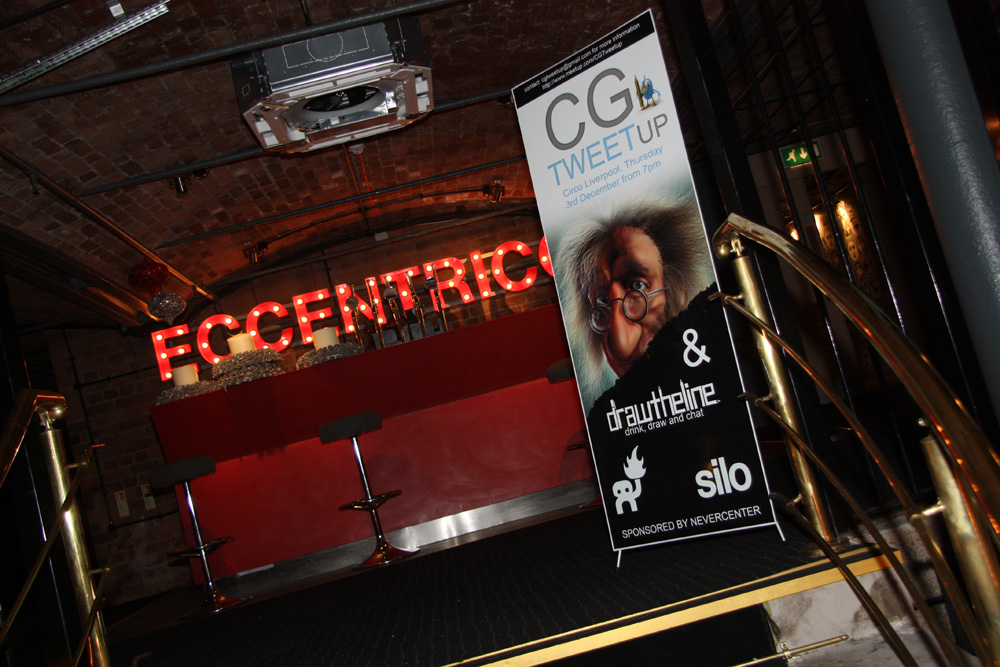
We held our December CGTweetup on Thursday 3rd December in Circo at the Albert Dock. This time we had a joint event with the cool guys from Draw-the-line and we were blown away by the attendance which topped sixty people. I put up a small gallery of photographs of the event taken by my photographer friend Gary Woodward.


A big thanks to our sponsors Nevercenter and also to the guys a Ballisitic Media for providing prizes. We're looking into doing our next event in February sometime and of course there is always the regular Draw-the-line event in Django's Riff on the first Thursday of every month.

I've asked Mike at Draw-the-Line if I could design one of the event flyers. I spend so much time doing 3D and I love getting to do 2D stuff. I made a start (ignore the dates on this one):


___________________________________________________________

Learning character/organic modeling in Cinema 4D


This is my third week using Maxons Cinema 4d and I've been posting my thoughts and first images all over the place. I thought it was about time I brought all my comments together in one place. I've started a thread at CGT that covers all this off and I'll continue to post my findings as I get more familiar with the software and toolset.

First things first. I have not abandoned Silo3D in any way. In my eyes it is still the best value sub-division modeling package on the market. I explained why I was moving over to Cinema 4D in this blog post here. I have spent a long time working with Silo as my main modeling solution and it will take a very special piece of software to make me move on.

A large amount of my first few weeks with C4D has been spent configuring the layout and shortcuts to suit my needs as an organic character/creature modeler. I wasn't thinking about getting heavily involved with the modeling tools at first but as the days rolled on I started to like the toolset and more-so the configurable palettes and layouts. Add to that the power hidden in the scripting and the ability to add those scripts to buttons and the modeling experience becomes very attractive. I remember doing all this with Maya back in version 6.5 but I have found C4D much easier to learn and therefore I want to keep going.

Lots of tools work as you would expect. A character modeler
needs a different set of tools from hard surface modeler. For example I can't remember the last time I used a Boolean operation. The common tools that I use in most 3D modeling packages work as expected including things like extrude, move/scale/rotate/face/point/edge/face/object etc. All very familiar and quickly mapped to my own liking. There are a few quirks and oddities that frustrate me but most can be overcome with tweaks, scripts or plugins.

Symmetry. For a character modeler one essential feature is having the ability to model with symmetry on and all central point to be locked to Zero on X. This is a 'given' to successfully model creatures, characters and heads. In R11 I've only found a symmetry tag which gives me a partial answer but I had to resort to two plugins to get what I needed. Symmetry clamp and Cactus Dans CD Symmetry had what I needed.


Selection of Tri and NGons. Towards the end of a modeling project I like to clean up the mesh removing Ngons and Tris. I have a process where I model a section (an arm for example) then check it and remove what I can using tools like spin quad (an old Lightwave term and favorite of some) or by deleting edges and cutting new ones. Then onto the body, check it, remove what I can etc. If you get into a habit like this you end up with very few stray 3 and more-than-four sided polygons to deal with at the end of a session. I still live by the mantra that the only good mesh is 100% Quadrangles. It is so frustrating to be nearing the end of a mesh and find that you have a stray triangle sitting right on the botton of a foot. To remove it you have to split all the way up the leg giving unwanted edges and poygons. It's much better to keep checking for Ngons and Tris throughout the modeling process and eliminate them whenever possible. To do this quicky and efficiently I like to have the two buttons at hand and mapped to keys (Alt+T and Alt+N)

Select NGons was from Bobtronic here

Select Tri's suggested by VDP at CGT :)

var cnt = op->GetPolygonCount();
if(!cnt) return;

var i;
var poly;
var bs = new(BaseSelect);

for(i=0; iGetPolygon(i);
if(poly->c == poly->d)
bs->Select(i);
}

op->SetPolygonSelection(bs);


Knife. This is a powerful tool and one that I loved in Lightwave and missed in Silo. However, to make it a fast and efficient addition to the toolkit I recorded a couple of scripts with the knife tool with certain settings switched on for example:

1. A Cut button and keycommand (X) which gives me the point to point or edge to edge cutting.

2. The Loop cut button which gives me the full split loop function.

These are all there to be had in the Knife attributes but having them on buttons and keys speeds the modeling process up. You can of course just double click the button to call the tools attributes then adjust them to get the desired effect but, again, this slows down modeling. To keep the processing flowing and more artistic these tools need to be accessable and available at the click of a button. One thing that slows a new modeler down is remembering which menu a tool is located in.

Knife Tool in Loop Mode:
CallCommand(1016030); // Knife
tool()#MDATA_KNIFE_MODE=2;

Tweak. The definition of tweak (for me!) is the ability to move componant parts (point, edge and face) in 3D space without having to select them first. In C4D you have to enter Tweak Mode and leave Default mode. Then when you've finished the tweaking go back to default mode. I am mush more comfortable having Tweak assigned to a Key hold so that you can quickly enter and leave the mode with the press/hold of a key. An analogy I use is that if you were writing a book you would not want to repeatedly press CAPS LOCK on and off all the time when you could simply hold down Shift for a capital letter. To improve things slightly I recorded a script that enters Tweak mode and also enters move mode. It only saves a single keystoke but you do use tweak with Move for 90% of the time.


Brush increase and decrease. This is a must and was achieved with a simple script from here. I much prefer mouse-wheel-roll for this sort of stuff but that is not implemented in the latest release. I got it here

Smooth (Average vertices): This is a vital modeling feature for me and it took me a while to get familiar with it in C4D. My favorite way to do it is to have a selection with an area effect and fall off (example: Select a nose and the effect falls off onto the face). Once selected I like to call the smooth command using a mouse wheel roll to run it incrementally. This isn't available in C4D so I use a combination of things to achieve the same effect. I use Live select in edge or face mode. Select the area I wish to tighten then call Brush>Smooth from my palette and click the area. This tightens the mesh giving the smoothing effect in the selected area. The other way is to call and use the 'Iron' tool. This is pretty much a tighten/average verts command but it feel clumsy at first.

Using the HUD. The HUD allows you to add certain menu items to the viewports. I like to add relevant sliders (Soft selection radius being a well used example) to a viewport to keep things flowing. You can save the document as template.c4d and that retains these HUD items but I'm still undecided if that's the best way to do it. The jury is out on this one so far as I am finding new and better ways to do this every day.

Retopogise: This is a great little script (a few lines of code is all that's needed) from Thomas Paleka at CGTalk. This little retop feature gives me a powerful little tool that allows me to generate my new geometry onto an existing high poly mesh. This is the best way to make clothing that fits a character and change bad edge flows. It is essentially the create- polygon tool with added oomph!!!

Loop and ring select. These work well and are well used.

Extrude/Smooth Shift/Matrix extrude all work perfectly and have lots of settings. I keep them handy in my modeling palette and have them mapped.

I intend to keep adding to this blog post so please check back if you are new to C4D. Please add your comments/additions/amendments below if I've missed something or you know of a great tool for organic modelers in Cinema 4D.

I need to say a massive thanks to everyone at CGTalk and on Twitter that has supported me in learning Cinema4D in recent weeks. And a couple of special thanks to Rob Redman from Pariah Studios. His tutorials have been a godsend. And to Dave Davidson who has put up with me pestering him for years now. Follow these guys all on twitter! It's well worth it!

___________________________________________________________

Draw the Line time again!


"Draw the Line" is a growing creative Liverpool art social event aimed at the everyman and artist alike to unite under one roof and enjoy a casual scribble.

Check here for information on upcoming events, look at photos from previous sessions and spot your own artistic contributions. Stay tuned and get involved.

Next Events:

Thursday 5th November - Django's Riff - 8PM onwards

Remember Remember the 5th of November, as we'll be having a

little give-away bonanza of some Art software DVDs

generously provided by Glen Southern, don't miss out!

Thursday 13th November - The Masque - 10PM onwards

A new and exciting venue to add to the list of places most doodled,

cheers to "Eat your Greens" for the invite!


___________________________________________________________

Blogging from Loch Ness and another CGTweetup on the way in December

I'm taking a weekend away from working and spending it in a log cabin with the family on the shores of Loch Lochie in Scotland. Josh (5) has wanted to visit Loch Ness for some years now and is sure he can locate Nessie. His facts and evidence have been drawn together from Scooby Doo and the Blake Clan and from 'The Water Horse'. I'm actually quite convinced by him and who am I to squash his dream. We looked at the Google Earth shots that clearly show a monster swimming in the loch and after seeing that we booked the trip. He is beginning to understand natural selection and is very clued up on fossils and dinosaurs so he is looking for a Plesiosaur fossil whilst were here. He is also influenced by Pokemon so he keeps telling me there is a creature in every Loch in Scotland and that here on the shores of Loch Lochie I could find Latios and Latias.

Ok, back to reality I think. I had a great Thursday evening in the company of my good friend CGTweetups Ant Filice in the Baltic Fleet public house in Liverpool. We had organised a meeting to plan the next CGTweetup and we had arranged to meet in Circo in the Albert Dock. After receiving a text telling me Circo were holding a fashion show it was either a night in drag or a trip across the way to the Baltic Fleet. I look shit in heels so the Baltic won. We got together with the guys from Draw-the-line, Glenn from Sparkle Media and my new ZBrush-wielding buddy Abe.

The outcome of the meeting is that we are planning to hold a combined CGTweetup and Drawing event in Liverpool on the 4th of December! Thats right, a room full of 2D and 3D artists all getting drunk and chatting and drawing and did I mention getting drunk! What better time to meet like minded people and make some new freinds and discuss what you're working on and what you want to work on. Details will be coming soon via twitter and CGArtist daily

And whilst you're waiting why not join the next Draw-the-line event:

"Draw the Line" is a growing creative Liverpool art social event aimed at the everyman and artist alike to unite under one roof and enjoy a casual scribble.

Check here for information on upcoming events, look at photos from previous sessions and spot your own artistic contributions. Stay tuned and get involved.

Next Events:

Thursday 5th November - Django's Riff - 8PM onwards

Remember, Remember the 5th of November,

Drawings and Doodles; the lot!

___________________________________________________________

Moving on to Cinema 4D and why.

Over the past decade I've tried out most of the highend 3D packages on the market. In this last week I've decided to adopt Maxons Cinema4D currently in version 11.5. I wanted to post a bit of an explanation as to why I decided to use C4D and the thought processes that got me here.
I cut my 3D teeth in the early 90's on 3DSdos on a 486 pc. I had been dabbling with an Amiga 1200 for years but never managed to create anything worthwhile. I liked the forerunner to max but I didn't really know any different. I learned all about NURBS with the amazing Rhino but quickly decided hard surface modeling wasn't for me. In 1999 I began to learn Lightwave and got very interested in a new program called ZBrush. Lightwave was a powerful subdivision modeling package but was missing some crucial tools at the time. Around the same time I was trying Caligari Truespace and an early version of Poser neither of which inspired me and I quickly stopped using them. ZBrush rocketed into the limelight with version 1.23b and grabbed the interest of the gaming world whilst Lightwave ambled into the new millennium with minimal changes and still missing things like ngons and a decent mirror function.
I really needed to find a solution to get my ZBrush sculpts into a rendering package and utilize displacement and normal maps. I've always thought of myself as an Illustrator who uses 3D, I don't animate and never want to. Having the ability to render your own characters and creatures is crucial and I just wasn't getting it.
I tried XSI, 3DSmax, Maya, Cinema4d and Modo but these were all big packages that can do much more than just model. I looked at the dedicated modeling packages at the time and tried Hexagon, Clay, Wings and Silo3d. For me, Silo won hands down and I've been modeling exclusively with it for over 5 years now. SO much so that I neglected to keep looking for the best render solution and focused just on my modeling skills.
So for the past few years any job I took worked like this: core polygon modeling all done in Silo. UV mapping in Headus UV. High polygon sculpting in ZBrush. Retopologizing done in Topogun or Silo. Texturing and map creation in ZBrush and Photoshop. Lighting, shaders and final renders.......errrrrr....And therein lies my issue!

Where to go from here. For some reason I've struggled to become proficient in any of the major rendering packages. I've been plugging away at Maya for years but find it hard to get good results at a speed that matches my modelling. Having spent a year working on improving my design skills including illustrator, toy design, pencil and ink work and marker work, I now need to firmly establish myself as a 3D illustrator by adding rendering to my skill set.
Hence a return to Cinema 4D, a package I had tried early in the decade and turned away from. Most of the people I've met this year in the toy design world are using C4D. Not exclusively but it was a high enough number to make me download the demo and take another look under the hood and Wow! was I impressed. It's easy to use. It's clearly laid out and it isn't hard to work out what everything does. It will take a lot to get me to stop using Silo as my core polygon modeling solution but this is the closest I've come. I was waiting for Blender 2.5 and I was hoping to adopt that package but having had a week with C4d my fate is sealed!.


As ever, theres people that help you along the way in life. For this little part of my journey I need to thank Dave Davidson, C4D guru. Glenn from Sparkle Media and my inspirational buddy Ant Filice. Pay it forward folks. You get more back in the end!


___________________________________________________________

SouthernGFX is down but not out

I've been having major issues this week with SouthernGFX. It turns out that my host had an over capacity issue which has never happened in all the years he's kindly hosted for me. Apparently it's all fixed now at their end but I seem to be missing pretty much everything. No site, FTP access, linked images etc. All down at my end. I'm being told that by friends around the world that they can access the site but that it now has errors. Very weird! All my linked images at the forums I post on are currently missing which is frustrating for anyone reading any of my posts.

On a brighter not the character work for Sparkle Media on Spring Heeled Jack is going well. As I've said on my forum it is nice to be working on a projects that I can share as it progresses. I've been posting everything at Twitsketch but luckily I've mirrored it all in my Flickr account which isn't affected buy my server problems.


___________________________________________________________

Draw the Line at Django's Riff in Liverpool


Anthony from CGArtist Daily and myself goodself took an evening off our busy schedules and made our way into the heart of Bohemian Liverpool on Thursday evening. We joined in with a Draw the Line event at Django's Riff right in the center of town. If you like relaxing with a group of artists from a wide range or backgrounds and skill levels it's worth a visit. It's held on the first Thursday of every month. I was surprised how friendly the atmosphere was and how comfortable if felt sitting in the middle of a club scribbling my doodles on a table top whilst having few scoops. Looking back my only issues is that I didn't take more photos of the end results. Video cam next time!. A big hand clap for Mike Snowden (www.themicrocosm.co.uk) the organiser of the evening.


___________________________________________________________